Virtual Campus
Created in 2024
Future Of Education
The integration of the metaverse, spatial computing, Web3, and AI is revolutionising the way we learn, through gamified elements & interactive platforms.

Train At Scale
Immersive technologies are reshaping the educational landscape. Global connection. Anywhere. Anytime.

BEYOND XR - Features
Showcase and Features

Immersive Learning Environment
The spatial environment creates an immersive, shared learning space that goes beyond traditional video calls, supporting presence, interaction, & movement. Within Netropolitan Academy, it enables experiential learning, community-led sessions, & future-focused education designed around participation, agency and digital sovereignty.
Global Collaborative Conferences
The space supports group conferences with participants joining from anywhere in the world, creating a shared sense of presence beyond traditional calls. Within Netropolitan Academy, this enables international cohorts, cross-border collaboration and collective learning without physical or geographical constraints.


Guided Immersive Learning
The space supports directed learning through voice-over guidance, controlled camera angles, & intentional pacing. Within Netropolitan Academy, this enables structured walkthroughs, narrative-led lessons, & immersive learning journeys aligned to human-centric digital education.
Participant Feedback
"As a Bocconi University Lecturer, incorporating the Netropolitan metaverse into our curriculum significantly impacted student engagement. Initially sceptical about the engagement levels we might achieve with a virtual campus, I was astounded by the overwhelmingly positive response from the students. The Netropolitan learning content transformed learning into an exciting adventure, with virtual treasure hunts stirring unprecedented enthusiasm. It was lauded as the most enjoyable class by many, offering fun, immersive experiences and delivering content that was not only innovative but deeply educational. This initiative, thanks to the BeyondXR team, has set new standards for virtual learning at Bocconi, with students and faculty looking forward to future innovations."
— Laura Pan, Bocconi University
.png)
.png)

The collaboration with Bykov-Brett Enterprises & BeyondXR was pivotal in making Global Digital Pride Cyprus a resounding success. Their expertise in immersive technology and commitment to inclusivity created an engaging and memorable experience for all participants. We look forward to future collaborations."
— Alexander Aleksashev-Arno, Choice LGBTQIA+
Features
Screen Share
The space supports built-in screen sharing, allowing hosts or presenters to display slides, videos, or live content in real time. This enables clear communication, collaborative walkthroughs, & seamless remote presentations within the environment.


Presentation
Includes a dedicated presentation area designed for talks, workshops and guided sessions. It gives the host a clear focal point to share content, direct attention and deliver experiences in a structured, professional way.
Interactive Avatars
Interactive avatars that guide participants through key features, areas and concepts. They provide contextual explanations on demand, helping visitors understand how to navigate and use the space independently. With AI avatar further expanding this functionality, built with your specific dataset and needs.

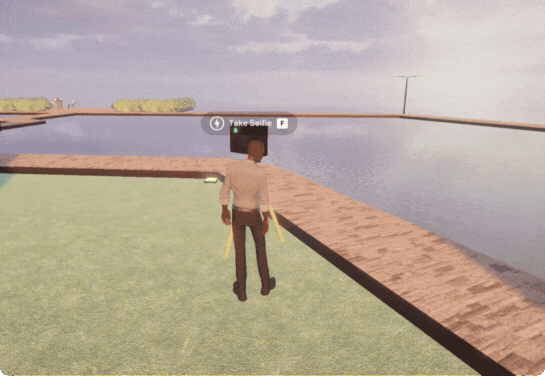
Photo Zone
A dedicated photo zone where participants can capture images together. It’s designed for moments of reflection, promotion, or celebration, making it easy to create shareable memories from the experience.
Focus Functionality
The space includes focus functionality that ensures every seat in the conference area has a clear view of the main screen. This keeps attention aligned, reduces visual obstruction and supports effective presentations and discussions.

Interactive Mini Game
Launches an activity that participants can engage with.
Adds energy, interaction, & playfulness to breaks, ice-breakers, or learning moments.


Cross Platform Functionality
Access on PC, via a mobile device or in full VR.


Host controls
Exclusive controls available only to the space host, designed to manage behaviour, content & flow.
.png)
Disable ShareScreen
- Prevents guests from sharing their screens within the space.
- Gives the host full control over visual content to avoid distractions or unapproved material.

Change Lighting
- Adjusts the environment lighting to simulate different times of day.
- Helps set the mood, improve visibility, or support the tone of sessions, events, or experiences.

Pin Movement
- Freezes all avatar movement within the space instantly.
- Allows the host to pause activity, regain attention, or create focused moments during sessions.

Teleport to Host
- Instantly moves all participant avatars to the host’s current location.
- Keeps the group together, reduces confusion, & maintains flow during guided experiences.

Set off Fireworks
- Triggers a visual fireworks effect across the space.
- Used to celebrate moments, mark milestones, or energise the room during events.

Lock & Unlock Doors
- Controls access to designated conference areas within the space.
- Allows the host to manage entry, privacy, & session flow in real time.